Forecast Revenue Summary
Report Parameters
|
Field |
Description |
|---|---|
|
Report Name |
The name of the report. |
|
Start Date |
The start date from when the data must be considered for generating the report. |
|
End Date |
The end date until when the data must be considered for generating the report. |
|
Building Codes |
A drop-down list consisting of all the building codes. All building records created in the Building Codes (Settings à Setup à Room à Building Codes) screen are displayed as options in the drop-down list. Users can select multiple or all the building codes from the list to be displayed in the report generated. |
|
Sort Options |
Available options include the following:
|
|
Group By Building |
When enabled, the system groups the records by building. |
Sample Report
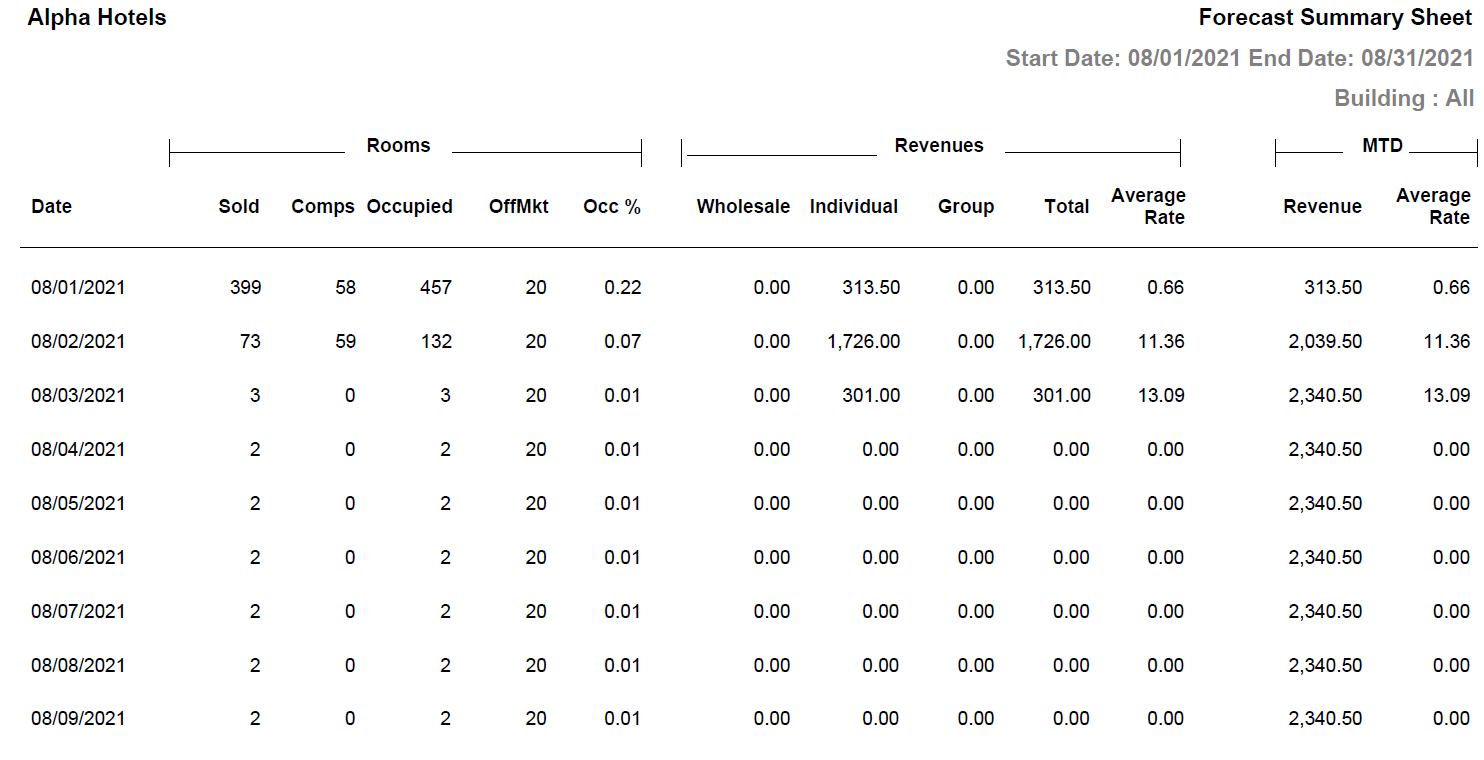
Report Fields
|
Field |
Description |
|---|---|
|
Date |
The date that falls in the date range selected in parameters. |
|
Rooms |
|
|
Sold |
Number of rooms sold. The count includes the number of group rooms sold also. |
|
Comps |
Number of comps rooms. |
|
Occupied |
Number of rooms occupied. |
|
OffMkt |
Number of off market rooms. |
|
Occ% |
The percentage of the total number of occupied rooms. (Total Number of Occupied Rooms / Total Number of Rooms) × 100 |
|
Revenues |
|
|
Wholesale |
The revenue earned by wholesaler bookings. |
|
Individual |
The revenue earned by individual bookings. |
|
Group |
The revenue earned by group bookings. |
|
Total |
The sum of revenues earned by wholesaler, individual and group bookings. |
|
Average Rate |
The difference of total revenue and adjustments is divided by room nights per market segment for date chosen in parameters. |
|
MTD |
|
|
Revenue |
The total revenue earned from month to date. |
|
Average Rate |
The difference of total revenue and adjustments is divided by room nights per market segment on monthly basis. |